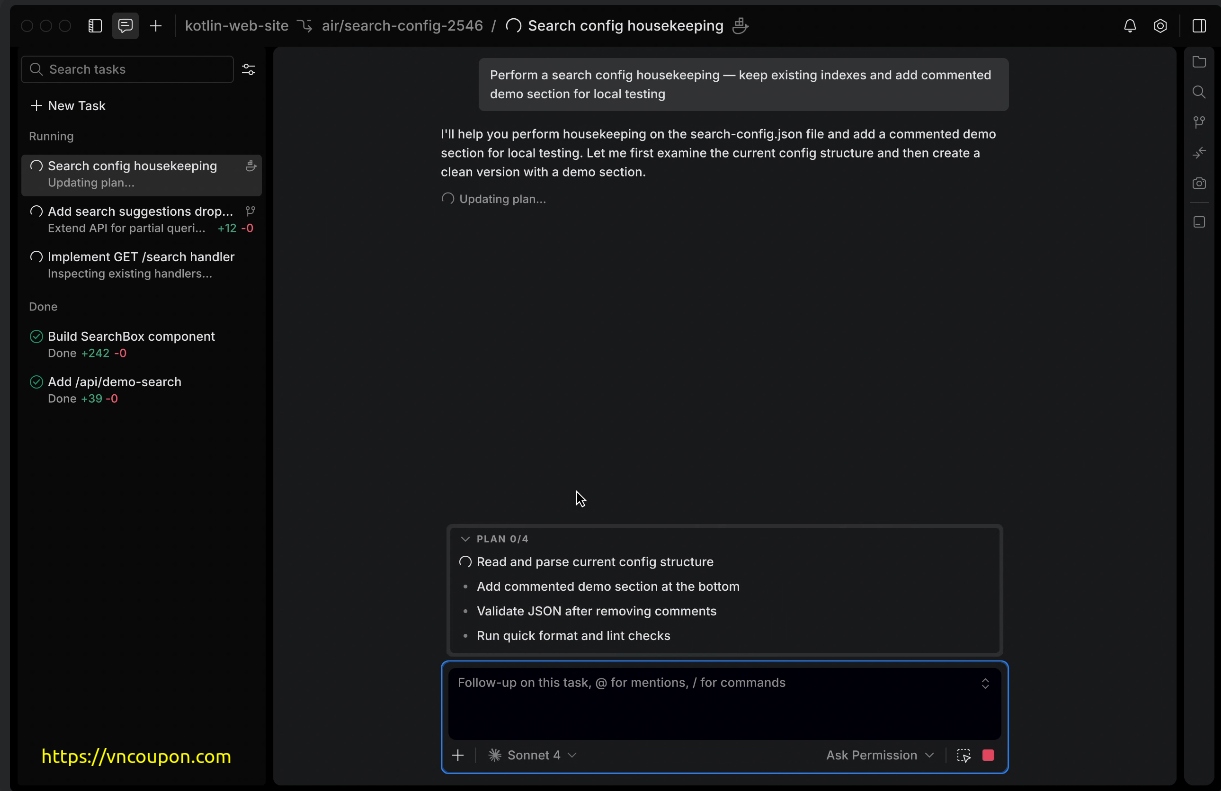
JetBrains Air Lands on Windows — Get 30 Free AI Credits to Celebrate
Windows developers, the wait is over. JetBrains Air — the dedicated desktop environment for agentic development — is now officially available on Windows. Since the initial launch on macOS and Linux, Windows support has been the single most requested feature from the developer community, and JetBrains has delivered.
Note: This promotion has ended. However, you can still claim a 1-week free trial for Claude Code – AI Coding Tool here:
🎁 Exclusive Offer: 30 Free AI Credits for Windows Users
To celebrate the Windows launch, JetBrains is offering 30 free AI credits to help new users get started. Here’s how to claim them:
- Download Air and log in with a JetBrains AI subscription account.
- Go to the AI section in JetBrains Account and click Top up AI Credits.
- Manually set the credit amount to 30.
- Apply the promo code
Air-On-Windows-30at checkout to get a 100% discount.
⏳ The promo code is valid until July 31, 2026. An active JetBrains AI Pro or Ultimate subscription is required to redeem this offer.
What Is JetBrains Air?
Air is a free desktop application designed to fill the gap between running AI agents in the terminal and working inside a full IDE. It gives developers a focused, purpose-built environment to run coding tasks, review results, and delegate work to AI agents — all without disrupting the main coding workflow.
One of Air’s standout characteristics is that it is agent-agnostic. Developers can switch between different AI agents on the fly, choosing the right tool for each task without being locked into a single provider.
Air is free to download and use on macOS, Windows, and Linux. It works with existing subscriptions — no separate purchase needed. Compatible plans include:
- JetBrains AI Pro or Ultimate
- OpenAI Codex subscription
- Google Gemini CLI
- Anthropic Claude Agent via API key
Which AI Agents Are Supported?
Air currently supports the following agents:
- Claude Agent (Anthropic) — via JetBrains AI subscription or API key
- Codex (OpenAI)
- Gemini CLI (Google)
- Junie (JetBrains)
Key Features
- Run multiple agents in parallel — launch several tasks simultaneously without conflicts, using Docker, Git worktrees, or cloud environments.
- Better task delegation — break down projects, assign different agents to different jobs, and match the right tool to each task.
- Enhanced oversight — monitor agent progress at a glance, check in asynchronously, and course-correct without losing context.
- Smarter code review — use language-aware navigation, reference files, commits, and symbols, and review agent-generated changes before committing.