

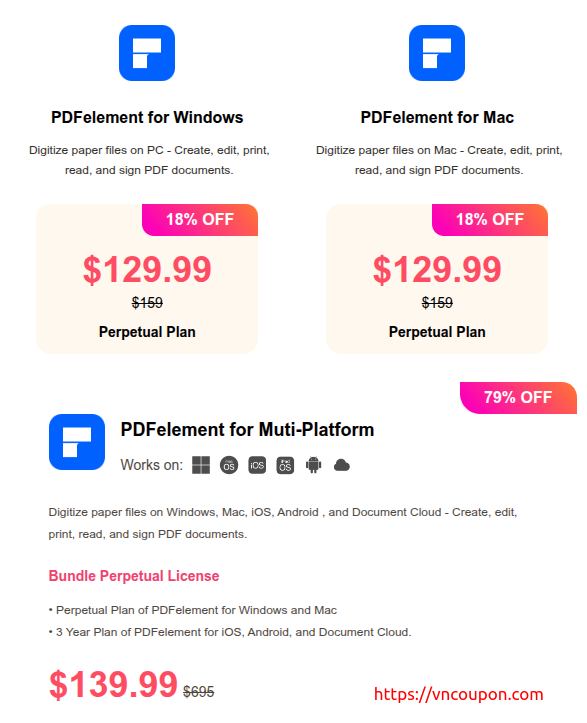
New Year Mega Sale brings an opportunity to save up to 79% on PDFelement, plus receive free PDF templates to boost productivity from day one. Designed for both Windows and Mac users, PDFelement makes it easy to digitize paper files, create, edit, read, print, and sign PDF documents with speed and simplicity—perfect for work, study, and everyday document management in the new year.
New Year Mega Sale!
Celebrate This New Year With Smarter PDF Tools Up To 79% Off
[ Promo Link ]
About PDFelement
Smart PDF Solutions, Simplified by AI.
One-Stop PDF solution powered by AI. A fast, affordable, and easy way to edit, convert, sign PDFs, and more – accessible across desktop, mobile, and web platforms.
Explore All PDF Features In PDFelement
1. AI PDF
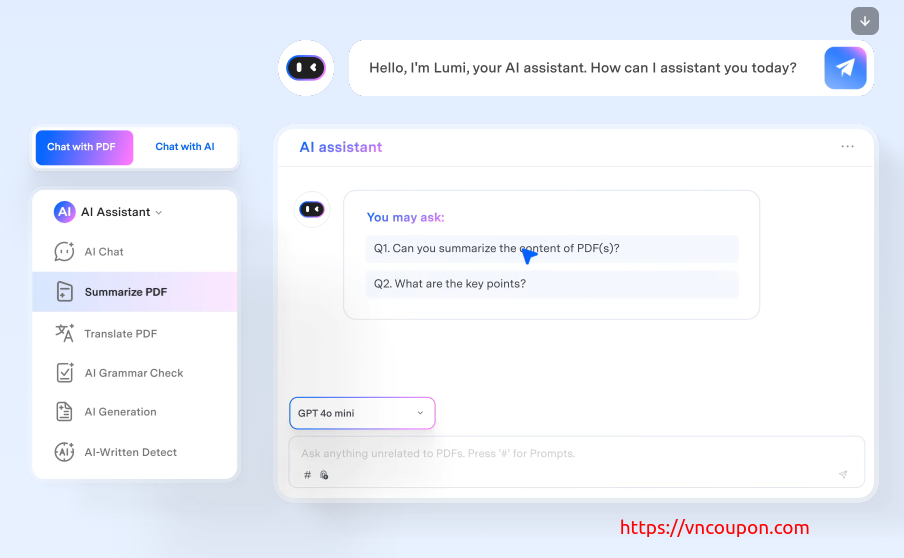
PDFelement integrates AI tools to help you work with PDFs more intelligently.
- Chat with PDF – interact with documents as if you were chatting.
- AI PDF Summarizer – generate concise summaries of long documents.
- AI PDF Translator – translate entire PDFs into different languages.
- AI Grammar Checker – correct grammar and spelling errors automatically.
- AI Rewrite PDF – rewrite or rephrase text for clarity or tone.
- Explain PDF – interpret and simplify complex content.
- AI Image Generator – create images directly within a PDF using AI.
- AI Content Detector – detect AI-generated content in documents.
2. Edit PDF
Edit PDFs as easily as working in Word.
- Modify text, images, and objects.
- Add watermarks, links, page numbers, headers/footers, or backgrounds.
- Insert multimedia elements such as videos and audio.
- Apply Bates numbering and manage layers within the file.
3. Convert PDF
Convert between multiple file formats effortlessly.
- Convert PDFs to and from Word, Excel, PowerPoint, ePub, images (JPG, PNG, TIFF), HTML, Markdown, XML, HWP/HWPX, and PDF/A.
- Support for batch conversion of multiple files at once.
4. OCR PDF
Use Optical Character Recognition (OCR) to make scanned files editable and searchable.
- Edit scanned PDFs or images directly.
- Extract data and text from scanned documents.
- Perform Area OCR for specific regions.
- Enhance recognition quality and run Batch OCR for multiple files.
5. Annotate PDF
Add comments, notes, and visual marks to your documents.
- Highlight, underline, strikethrough, or freehand draw on pages.
- Add sticky notes, text boxes, shapes, and stamps.
- Use measurement tools and erasers for detailed markup.
6. Create PDF
Create PDFs from various sources.
- Generate PDFs from Office files, images, HTML, web pages, clipboard, or scanners.
- Create blank PDFs or PDF portfolios.
- Batch-create multiple PDFs at once.
7. Organize PDF
Manage and arrange pages easily.
- Insert, delete, split, merge, rotate, reorder, or replace pages.
- Crop margins or extract specific pages.
- Combine multiple PDFs into one document.
8. Read PDF
Enjoy a flexible and intelligent reading experience.
- AI-assisted reading with summarization, rewriting, or text-to-speech.
- Automatic bookmarking.
- Reading modes such as 3D view or eye protection mode.
9. Protect PDF
Secure your documents from unauthorized access.
- Add passwords to restrict editing, copying, or printing.
- Remove hidden metadata or sensitive information.
- Use Smart Redact to hide confidential data automatically.
10. PDF Forms
Create and manage interactive fillable forms.
- Fill and edit existing PDF forms.
- Add form fields such as text boxes, checkboxes, radio buttons, and signatures.
- Automatically recognize form fields.
- Extract form data and support XFA form editing.
11. Advanced Tools and Batch Features
- Compress PDF – reduce file size without losing quality.
- Batch Processing – apply conversions, edits, encryption, or printing to multiple files simultaneously.
- Combine PDF – merge multiple files or images into one document.
- Crop PDF – adjust page size and margins.
- Extract Data – extract text, images, or tables from PDFs.
- eSign PDF – add and send electronic signatures securely.
- Share PDF – send via email, link, or QR code; request signatures.
- Print PDF – print double-sided, multiple pages per sheet, or in bulk.
![[New Year 2025] Sparked Host – 2GB VPS only $12.99/yr!](https://vncoupon.com/wp-content/uploads/2024/12/Sparked-Host-VPS-Hosting-Promo-300x200.png)
![[New Year 2023] DesiVPS – Special VPS Promotion Offer from $20/Year](https://vncoupon.com/wp-content/uploads/2022/05/DesiVPS-NVMe-SSD-VPS-in-LosAngeles-300x200.png)
![[New Year 2026 Sale] Colonel Server – 40% Off All Hosting Plans](https://vncoupon.com/wp-content/uploads/2025/12/Colonel-Server-New-Year-2026-Hosting-Sale-300x200.png)
![[New Year 2026] RackNerd VPS Deals from $11.29/Year](https://vncoupon.com/wp-content/uploads/2025/04/RackNerd-New-Year-2026-VPS-Hosting-Sale-300x200.png)
![[New Year 2025] Exclusive Deals on Hosting, Cloud, VPS & Domains](https://vncoupon.com/wp-content/uploads/2024/12/VNCoupon-New-year-Sale-VPS-Hosting-Domain-300x200.png)
![[Flash Sale] Time4VPS offer 50% Off All VPS Packages](https://vncoupon.com/wp-content/uploads/2021/01/Time4VPS-New-Year-2021-Offers-50-Percen-Off-300x200.png)
![[Xmas 2020] HostNamaste Christmas and New Year Deals – OpenVZ VPS from $10/Year and KVM VPS from $15/year](https://vncoupon.com/wp-content/uploads/2020/12/HostNamaste-Christmas-New-Year-2020-Deals-300x200.jpg)
![[New Year 2026 Sale] EaseUS – Up to 68% off software deals](https://vncoupon.com/wp-content/uploads/2025/01/EaseUS-New-Year-Software-Sale-2026-300x200.png)